
Code VBA dưới đây hỗ trợ nhập đồng thời nhiều file text từ một thư mục.
Các thực hiện:
- Trong excel nhấn tổ hợp phím Alt + F11 keys to enable Microsoft Visual Basic for Applications window.
- Click Insert > Module, copy xong paste code VBA bên dưới.
- Nhấn phím F5 để thực thi lệnh
- Chọn thư mục chứa file text
- Excel tự động nhập giá trị chứa trong từng file text, mỗi file text sẽ tạo một sheet riêng

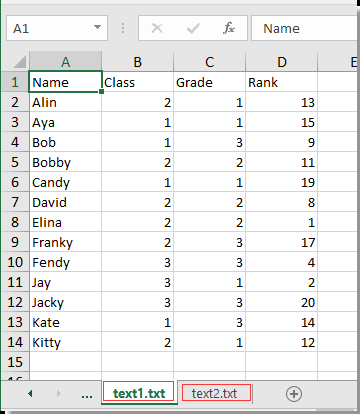
Code VBA:
Sub Test() Dim xWb As Workbook Dim xToBook As Workbook Dim xStrPath As String Dim xFileDialog As FileDialog Dim xFile As String Dim xFiles As New Collection Dim I As Long Set xFileDialog = Application.FileDialog(msoFileDialogFolderPicker) xFileDialog.AllowMultiSelect = False xFileDialog.Title = "Select a folder [Kutools for Excel]" If xFileDialog.Show = -1 Then xStrPath = xFileDialog.SelectedItems(1) End If If xStrPath = "" Then Exit Sub If Right(xStrPath, 1) <> "" Then xStrPath = xStrPath & "" xFile = Dir(xStrPath & "*.txt") If xFile = "" Then MsgBox "No files found", vbInformation, "Kutools for Excel" Exit Sub End If Do While xFile <> "" xFiles.Add xFile, xFile xFile = Dir() Loop Set xToBook = ThisWorkbook If xFiles.Count > 0 Then For I = 1 To xFiles.Count Set xWb = Workbooks.Open(xStrPath & xFiles.Item(I)) xWb.Worksheets(1).Copy after:=xToBook.Sheets(xToBook.Sheets.Count) On Error Resume Next ActiveSheet.Name = xWb.Name On Error GoTo 0 xWb.Close False Next End IfEnd SubTải file excel tạo sẵn tại đây:
Facebook Comments